> ## Documentation Index
> Fetch the complete documentation index at: https://explore.boost.shop/llms.txt
> Use this file to discover all available pages before exploring further.
# Post-Purchase A/B Testing
Would a deeper discount win more one-click adds? Should your second offer show best sellers instead of AI picks? Post-Purchase A/B Testing runs your current two-offer setup against one variant on live orders and shows you which sequence converts more.
# What it is
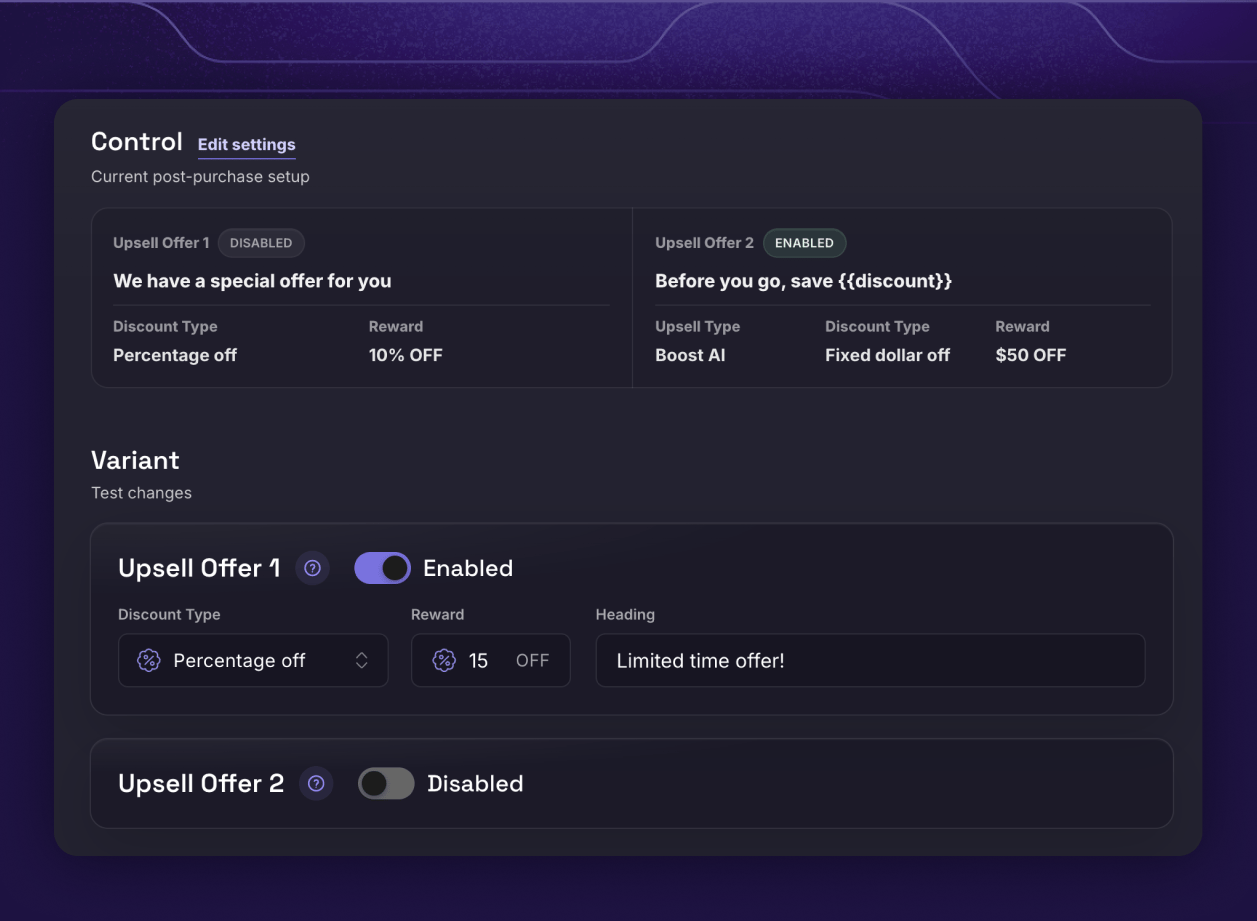
Post-Purchase A/B Testing lets you test the offers your customers see right after they pay, the way you'd test an ad: two versions, a 50/50 split, one winner. Your live Post-Purchase Upsells settings become the Control automatically, and you build one Variant that changes the same two-offer sequence — the discounts, the headings, whether an offer runs at all, and what the second offer shows.
You'll find it in Boost Admin under **Post Purchase Upsells → A/B Tests**. Like the feature itself, it runs on every Boost plan — no Shopify Plus required.
# The problem it solves
The moment after checkout is one of the highest-converting offers you run — and today, tuning it is a guess:
* **You set the offers once and never question them.** Is 15% off the right discount for the repeat offer? Would your second page convert better with best sellers than AI picks? Most stores never find out.
* **Before-and-after comparisons lie.** Change an offer, watch acceptance for two weeks, and traffic shifts drown out the signal. Only a same-time split on the same orders isolates the change.
* **No testing tool can reach this page.** The post-purchase page lives between payment and the order confirmation, inside Shopify's checkout flow — generic A/B tools never see it.
Boost tests the post-purchase sequence itself, natively, with zero risk to the order that was just placed.
# How it works
**1. Create your test.** Your live post-purchase settings load in as the Control. The Variant changes the same two-offer sequence — turn an offer on or off, change a discount or heading, or give Offer 2 a different method (Boost AI, best sellers, or hand-picked products). At least one offer stays enabled.
**2. Schedule it.** Pick a start and end date and publish, or schedule it ahead — Boost starts and stops the test for you. Tests run on ET (Eastern Time) days, starting at 12:00 AM and ending at 11:59 PM.
**3. Boost splits eligible checkouts 50/50.** Each customer who reaches the post-purchase page is assigned to one version, and both versions are locked in at launch — so mid-test edits never muddy your results. Zero risk, as always: the original order is already captured before any offer shows.
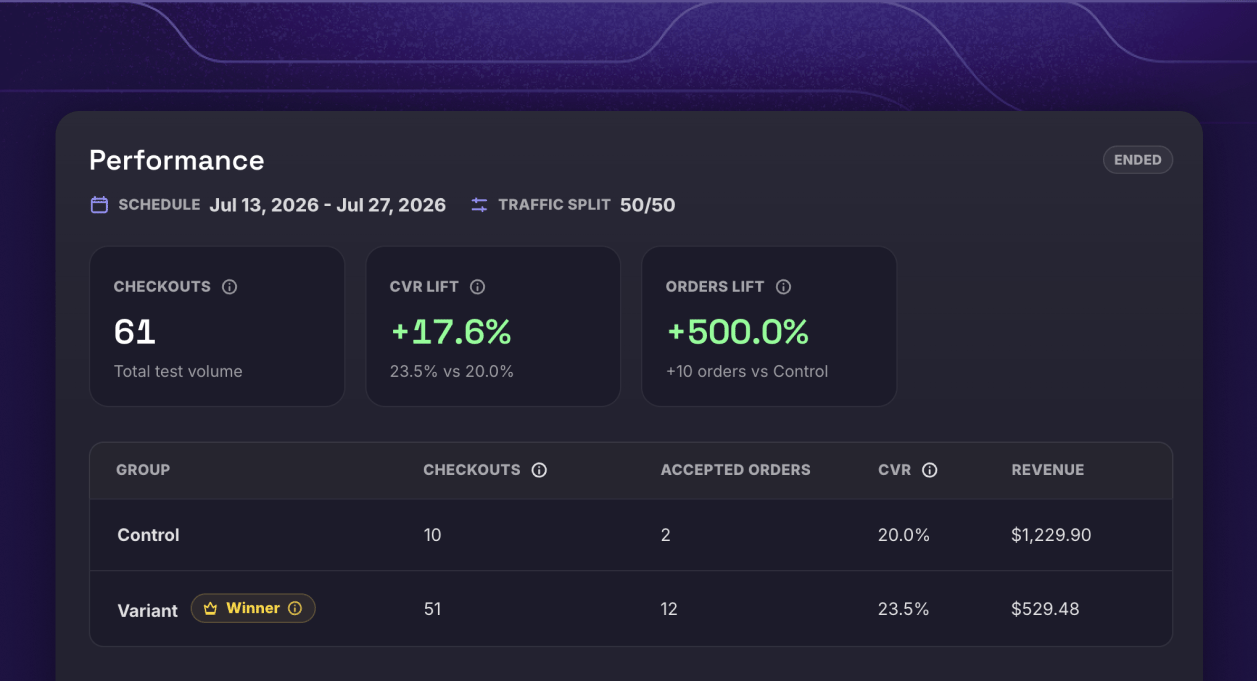
**4. Read the report, keep the winner.** Checkouts, conversion, revenue, and orders for each version — plus a per-offer breakdown showing which products were shown, which were accepted, and what they earned. A **Leading** badge marks the version converting better while the test runs, and the **Winner** is crowned when it ends.
# What you get
* **An answer with zero risk.** The sale is already made before either version shows an offer — a test can only add revenue, never cost you the conversion.
* **Offer-by-offer insight.** See Offer 1 and Offer 2 separately — accepts, revenue, and a product breakdown for each — so you learn *which* offer carried the win.
* **Test orders you can find in Shopify.** Boost tags every order in the test — like `Boost PP AB1 Control` and `Boost PP AB1 Variant` — whether the customer accepted, declined, or closed the page, so you can compare both groups in Shopify Admin.
* **A tuned sequence, not a set-and-forget one.** The offers most stores configure once and never revisit become something you improve on evidence.
# Works with your stack
* **Do I need Shopify Plus?** No. Post-Purchase A/B Testing runs on every Boost plan, same as Post-Purchase Upsells.
* **Do I need anything extra?** Just the same setup as the feature itself: Boost selected as your post-purchase app in Shopify's checkout settings. You can draft tests before that's done — and publish the moment it is.
* **Do I have to rebuild my offers to test them?** No. Your live post-purchase settings become the Control automatically — you only build the Variant.
* **What can the Variant change?** Both offers' discounts, headings, and enabled state, plus Offer 2's product method and hand-picked products. The two-offer sequence is tested as a whole — one version per checkout, and logged-in customers keep the same version across checkouts.
* **How many tests can I run?** One post-purchase test at a time. Pause or end a test whenever you want — the report keeps everything it's learned. Resuming a paused test just needs its schedule to still be open.
***
# Ready to find your best post-purchase sequence?
Stop guessing what to offer after the sale. Run the test, read the report, keep the winner.
Start Free Trial
***
# Continue to Explore
The after-the-sale offers you're testing — one click, zero risk.
Test your cart's reward tiers the same way — ladder vs. ladder.
Test your in-checkout offers too — the Shopify Plus counterpart.