> ## Documentation Index
> Fetch the complete documentation index at: https://explore.boost.shop/llms.txt
> Use this file to discover all available pages before exploring further.
# Collections
***
# Collections
Replace your default Shopify collection page with a faster, hosted browsing page — custom filters, real-time search, and merchandised product cards that turn browsing into bigger carts. Included in every Boost plan.
# What it is
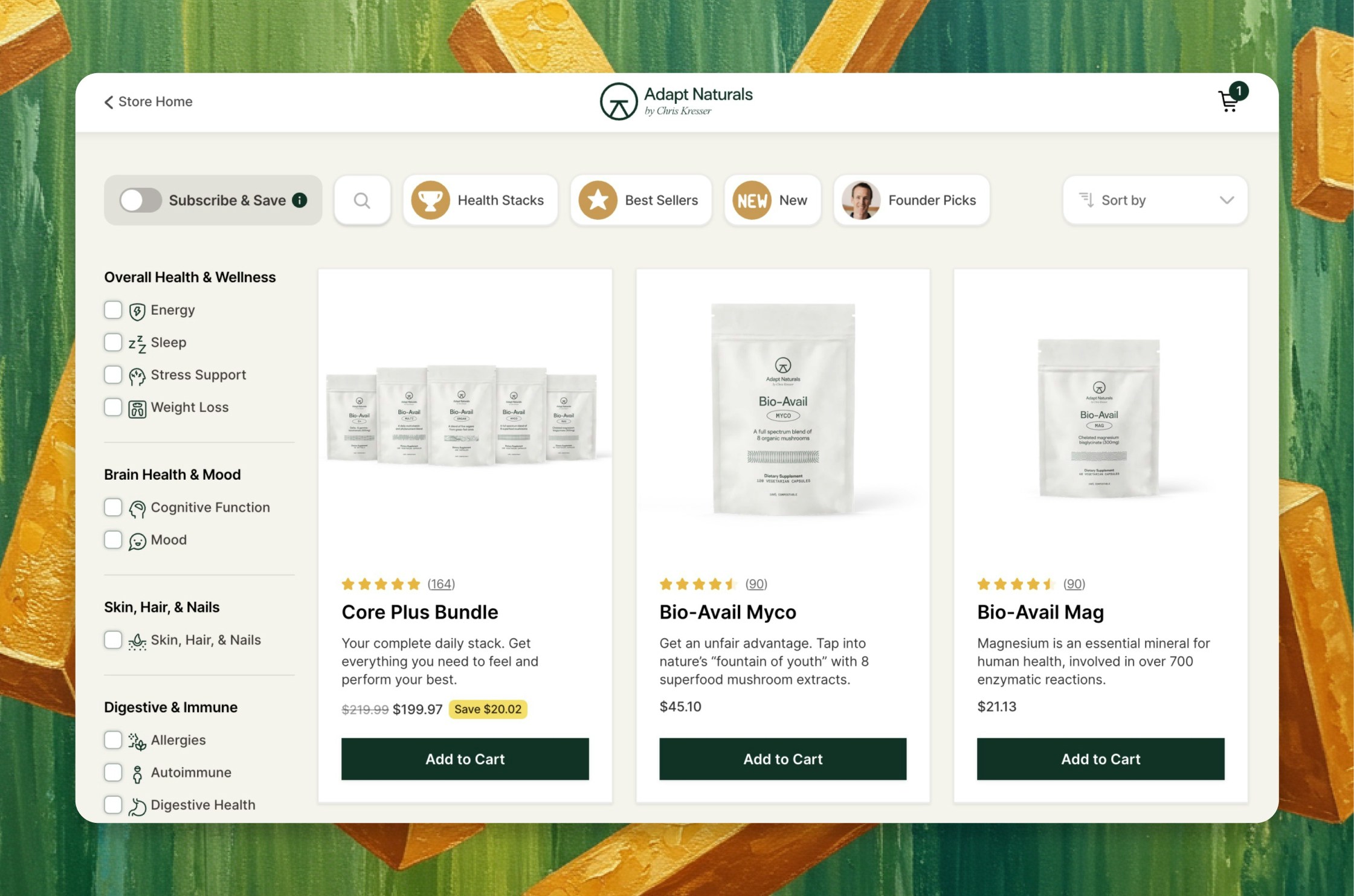
Collections is a hosted browsing page Boost serves on your store in place of the plain Shopify collection grid. Shoppers filter your catalog the way you sell it, search in real time, and see product cards built to merchandise — custom images, review stars, and subscribe callouts — so finding the right product is fast and the click to cart is easy.
It's the same global filter system that powers your [Bundle Builder](/pages/bundleBuilder), so the way you organize your catalog is consistent everywhere shoppers browse. Included in every Boost plan — no separate search-and-filter app to bolt on.
# The problem it solves
Your collection page is where most shoppers actually browse your catalog — and the default version works against them:
* **The default Shopify collection page is a plain grid.** Weak filtering, no real merchandising, slow to load — a shopper who can't quickly find what they want bounces, and you lose the sale before it starts.
* **Bolt-on search and filter apps are another tool to run.** Adding decent filtering usually means a separate app, another bill, and another integration that doesn't match the rest of your store.
* **Most browsing isn't built for how CPG shoppers think.** Supplement and food customers shop by goal, concern, or ingredient — not just by product category — and a generic collection page can't guide them that way.
Boost makes the browsing page itself a conversion tool — fast, merchandised, and organized the way your customers actually shop.
# How it works
Boost serves a hosted collection page on your store, tuned to how you merchandise — nothing for the shopper to learn.
**1. The shopper lands on your collection page.** A fast, hosted page with your branding, built to load quickly and guide the eye.
**2. They filter the way you sell.** Hero filters across the top — custom categories like "Sleep," "Gut Health," or "Best Sellers" — and sidebar filters for finer refinement, both built on filters you define.
**3. Real-time search narrows in.** As a shopper types, results update live across your catalog by title and description, so they reach the right product fast.
**4. Merchandised cards drive the click.** Each product card can carry custom images, review stars from your review app, and a subscribe callout — so the card sells, not just lists.
You set the filters, search, card styling, and appearance in a setup wizard — no code, with the same filters running your Bundle Builder.
# What you get
* **Faster discovery, higher conversion.** When shoppers find the right product fast, more of them buy — the browsing page stops leaking sales and starts closing them.
* **Merchandising that lifts the click.** Product cards with real images, review stars, and subscribe callouts turn a plain grid into a curated storefront that moves shoppers to cart.
* **Browse the way CPG shoppers think.** Filter by goal, concern, or ingredient — the way supplement and food customers actually shop — so they reach what's right for them.
* **Tracked on the Moneyboard.** Collection Boost shows up as its own revenue stream, so you see in plain dollars what better browsing earns you.
# Works with your stack
* **Is this an add-on?** No — Collections is included in every Boost plan. It's part of the Boost foundation, not a separate search-and-filter app or an extra bill.
* **Does it replace my Shopify collection page?** It's a hosted page Boost serves on your store, built to replace the plain default grid with a faster, merchandised browsing experience — your branding, your products underneath.
* **Does it work with my review app?** Yes. Product cards integrate with the review apps you already run, like Loox and Stamped, so your star ratings show right on the card.
* **Does it work with my subscriptions?** Yes. Subscribe callouts on the collection page run through the subscription provider you already use, so shoppers can choose to subscribe as they browse.
***
# Ready to turn browsing into buying?
Give your shoppers a collection page built to find, merchandise, and convert — included in every Boost plan, organized the way your customers actually shop.
Start Free Trial
***
# Continue to Explore
The same filters, powering a build-your-own-box experience.
The best cart on Shopify — where browsing turns into bigger orders.
See the revenue better browsing drives, in plain dollars.